
Home / Services / AODA website requirements
AODA website requirements, in plain English
If your business has 20 or more employees in Ontario, you have an accessibility report due by December 31, 2026. If you have 50 or more, your public website also has to meet WCAG 2.0 Level AA. Here’s what that means and what to fix.
The short answer
What are the AODA website requirements?
Under the Accessibility for Ontarians with Disabilities Act, designated public sector organizations and businesses or non-profits with 50 or more employees must make their public websites accessible. The standard is WCAG 2.0 Level AA, except live captions (1.2.4) and pre-recorded audio descriptions (1.2.5). It covers websites and web content published after January 1, 2012. Source: ontario.ca, How to make websites accessible.
Not legal advice
I build and fix websites. I’m not a lawyer. Everything here comes from ontario.ca and Ontario Regulation 191/11, checked on October 9, 2026. For a formal opinion on your obligations, ask a lawyer.
Who it applies to
Who has to comply?
The rules depend on how many people you employ in Ontario, and the website rule and the reporting rule have different thresholds.
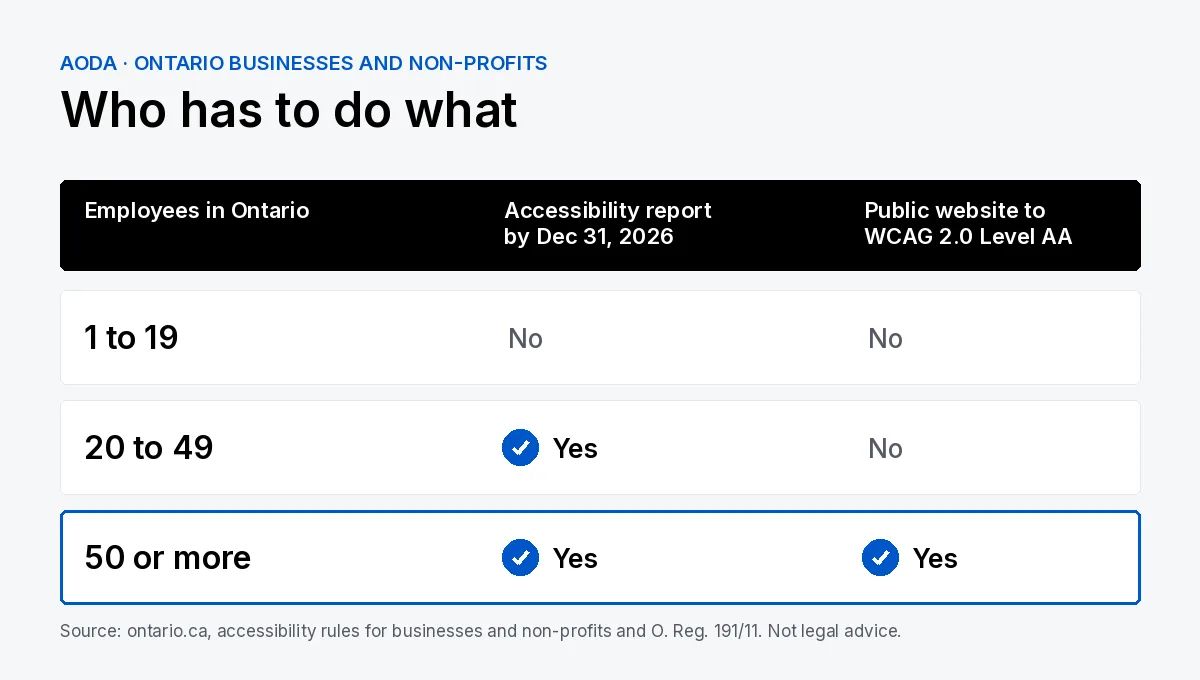
50 or more employees, and the public sector
Your public website must meet WCAG 2.0 Level AA, and you file the compliance report.
20 to 49 employees
The website rule doesn’t apply, but you still file the accessibility compliance report by December 31, 2026, per Ontario’s rules for businesses and non-profits.
Fewer than 20 employees
No website rule and no 2026 report, but other AODA duties still apply. “Small businesses are exempt” isn’t accurate.
The deadline
The December 31, 2026 compliance report
Businesses and non-profits with 20 or more employees file an accessibility compliance report every three years, and the current one is due December 31, 2026. Ontario explains what’s in it and how to file on its completing your accessibility compliance report page.
If you have 50 or more employees, the report asks you to confirm your public website meets the standard. That’s hard to say yes to honestly if nobody has checked, so it’s worth leaving time before December to find and fix the problems.
In practice
What WCAG 2.0 Level AA means on a real website
Colour contrast
Body text needs enough contrast with its background, generally 4.5 to 1. Light grey on white is the classic failure.
Images and alt text
Every meaningful image needs a short text description for screen readers. Decorative images should be marked so they’re skipped.
Headings and structure
One main heading per page, then headings in order. Screen reader users jump between them to find their way around.
Keyboard navigation
Everything has to work with the Tab key alone, with a visible focus outline so people can see where they are.
Forms and errors
Every field needs a real label, and error messages have to say what went wrong in text, not just turn a box red.
Links
Links in body text can’t be identified by colour alone. An underline is the simple fix.
Video, captions and documents
Pre-recorded video with sound needs captions, and documents you publish should be readable by assistive technology. Ontario’s two exceptions are live captions (1.2.4) and pre-recorded audio descriptions (1.2.5).
From my own work
The failures I see most often
When I ran a full accessibility pass on my own site this year, the problems were the same ones I find on client sites:
Low-contrast grey text. Fashionable pale greys that fall just under the contrast ratio.
Links shown by colour only. Blue text with no underline inside paragraphs.
Duplicate or missing main headings. Page builders often add a second H1 without anyone noticing.
Broken skip links. A hidden “skip to content” link that points at nothing.
None of these were expensive to fix. They just had to be found.
Self-check
How to check your website
Run an automated scan. Free tools like Lighthouse in Chrome catch contrast, missing alt text and missing labels. They catch some issues, not all of them.
Unplug your mouse. Tab through your homepage and contact form. If you get stuck or lose track of where you are, that’s a failure.
Try a screen reader. VoiceOver on a Mac or iPhone, or NVDA on Windows. Listen to whether your headings and buttons make sense.
Review your content. Videos without captions, scanned PDFs, and images of text are the usual gaps.
About widgets
An accessibility overlay or toolbar doesn’t fix the code underneath. The fixes still have to happen on the site.
Under 50 employees
If you have fewer than 50 employees
You’re not legally required to meet WCAG 2.0 AA, but I’d still do the basics. More people can use the site, including customers who rely on a screen reader or keyboard, and much of the work overlaps with good SEO: clear headings, real text, descriptive images and fast, clean pages.
Getting there
Getting your site to WCAG 2.0 AA
My free audit can include an accessibility check of your key pages.
FAQ
Frequently asked questions
Does AODA apply to my website if I have fewer than 50 employees?
The website rule doesn’t. It applies to businesses and non-profits with 50 or more employees, and to designated public sector organizations. But if you have 20 or more employees, you still have to file an accessibility compliance report by December 31, 2026, and other AODA duties still apply.
Is the AODA standard WCAG 2.0 or 2.1?
The regulation names WCAG 2.0 Level AA. WCAG 2.1 builds on 2.0, so a site built to 2.1 AA will generally meet 2.0 AA as well. If you’re starting fresh, I build to the newer guidelines. Check ontario.ca or ask a lawyer if you need a formal answer.
When is the 2026 accessibility compliance report due?
December 31, 2026, for businesses and non-profits with 20 or more employees in Ontario. The report is filed every three years. Ontario explains how to complete and file it on its accessibility compliance report page.
Does it cover content published before 2012?
No. The website rule applies to websites and web content published after January 1, 2012. Older content that you’ve since updated may count as new, so it’s worth checking anything you’ve edited recently.
Do PDFs on my site need to be accessible?
Ontario’s rule covers web content, and documents you publish on your public site are part of that content. A scanned PDF with no real text is the usual problem. Where you can, put the information on a web page and keep the PDF as an extra.
Does an accessibility widget or overlay make my site compliant?
Not on its own. A widget adds a toolbar on top of the page, but it doesn’t fix the underlying code or content, such as missing labels, poor contrast or broken keyboard navigation. Those still need to be fixed on the site itself.
Do internal sites, like an intranet, count?
Not for businesses and non-profits. Ontario’s website rule covers public websites. Internal sites such as an intranet or extranet aren’t included for private-sector organizations.
Keep reading
Related services and guides
Find out where your site stands before December
Send me your URL. I’ll check your key pages for the common accessibility failures and email you back what needs fixing, in plain English.